SFEPRAPY Preprocessor
Prior to this tool, it requires someone to take measurements from drawings (e.g. from PDFs) and work out input parameters based on the occupancy type etc. Then these inputs need to be manually entered onto a spreadsheet. If there are 100 fire compartments (i.e., simulation cases) in the assessed building then measurements have to be taken 100 times. This process can be laborious and prone to human errors.
This tool is designed to (almost) directly convert Bluebeam markups to a SFEPRAPY input file:
Where
\(\text{Measurement file}\) is a CSV file exported from Bluebeam containing the markup data.
\(\text{Database file}\) is a CSV/XLSX file prepared by the user containing occupancy dependent parameters.
The process involves the following key steps:
Export the Bluebeam markups to a file, usually named m.csv.
Prepare a database file, usually named d.xlsx.
Produce a SFEPRAPY input file by using FSETools.
Prepare Bluebeam Markup
Occupancy Type

Compartment
Markup a fire compartment by using area measurement in Bluebeam. Ensure the following are set appropriately:
Subject should be COMPARTMENT to hint this object is used to indicate a fire compartment.
Label should be a string to represent the associated case name (i.e., simulation case name in SFEPRAPY).
Depth should be set as the room (floor to soffit) height.
Color should match the occupancy characteristics as defined in Section 4.1.
Case name (i.e. Label) should be unique among all COMPARTMENT objects.

Fire Spread Path
Markup a fire travel path (or room depth) by using area measurement in Bluebeam. Ensure the following are set appropriately:
Subject should be COMPARTMENT_LENGTH to hint this object is used to indicate a fire travel path (or room depth).
Label should be a string to represent the associated case name (i.e., simulation case name in SFEPRAPY).
A compartment (or case name) can only have one COMPARTMENT_LENGTH.

Window
Markup a fire compartment by using area measurement in Bluebeam. Ensure the following are set appropriately:
Subject should be WINDOW (or DOOR) to hint this object is used to indicate a window opening (or a door opening).
Label should be a string to represent the associated case name (i.e., simulation case name in SFEPRAPY).
Depth should be the window (or door) clear opening height.
Ensure all ventilation openings are appropriately marked up.

Door

Special Circumstances
Repeated Compartments
Only one simulation case is necessary for compartments share similar/identical geometry and ventilation arrangements. Once a base case is measured, the repeated compartments only needs to measure the floor area (i.e. Compartment) with its name/label identical to the base case but with a trailing underscore. Below shows an example.

Repeated Floors
Where a floor plate repeats for example on levels one to ten the drawing sheet for this can be named “L01-L10”


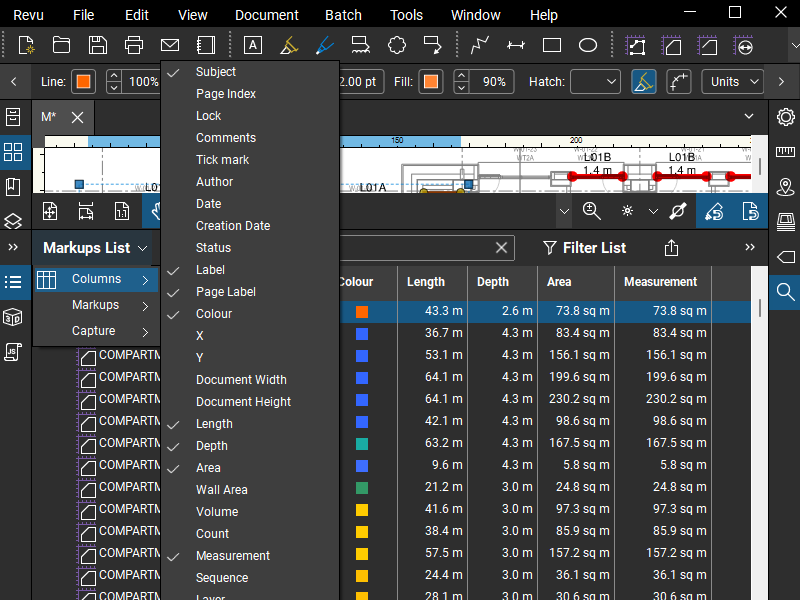
Prepare Database File
A database file (usually named d.xlsx) containing design fire input parameters for the different occupancy types is required. Contact Ian or Ieuan to obtain a template database file.
Produce SFEPRAPY Input File
This step is fairly straight forward, select the d.xlsx and m.csv then click Submit button. Then the resultant SFEPRAPY input file will be saved under the same folder containing m.csv.
If no file is produced then it is likely that there are errors in the d.xlsx or m.csv. Error messages are shown in Console (View -> Console). In the example below, compartment length is missing for compartment (simulation case) L01B.

Important
It is the user’s responsibility to make sure the parameters in the input file are appropriate. The following checks are recommended:
Make sure the scale is appropriately set in Bluebeam.
Make sure the number of simulation cases in the input file matches the markup.
Make sure the sum of
general_room_floor_areafor all cases matches the total floor area of the building.Check for door and window heights, for example to make sure they are not greater than room height.